Why choose TeamOrgChart?
TeamOrgChart is organization chart software built for Microsoft 365.
It helps organizations create, maintain and share accurate, interactive org charts without redrawing diagrams every time the business changes.
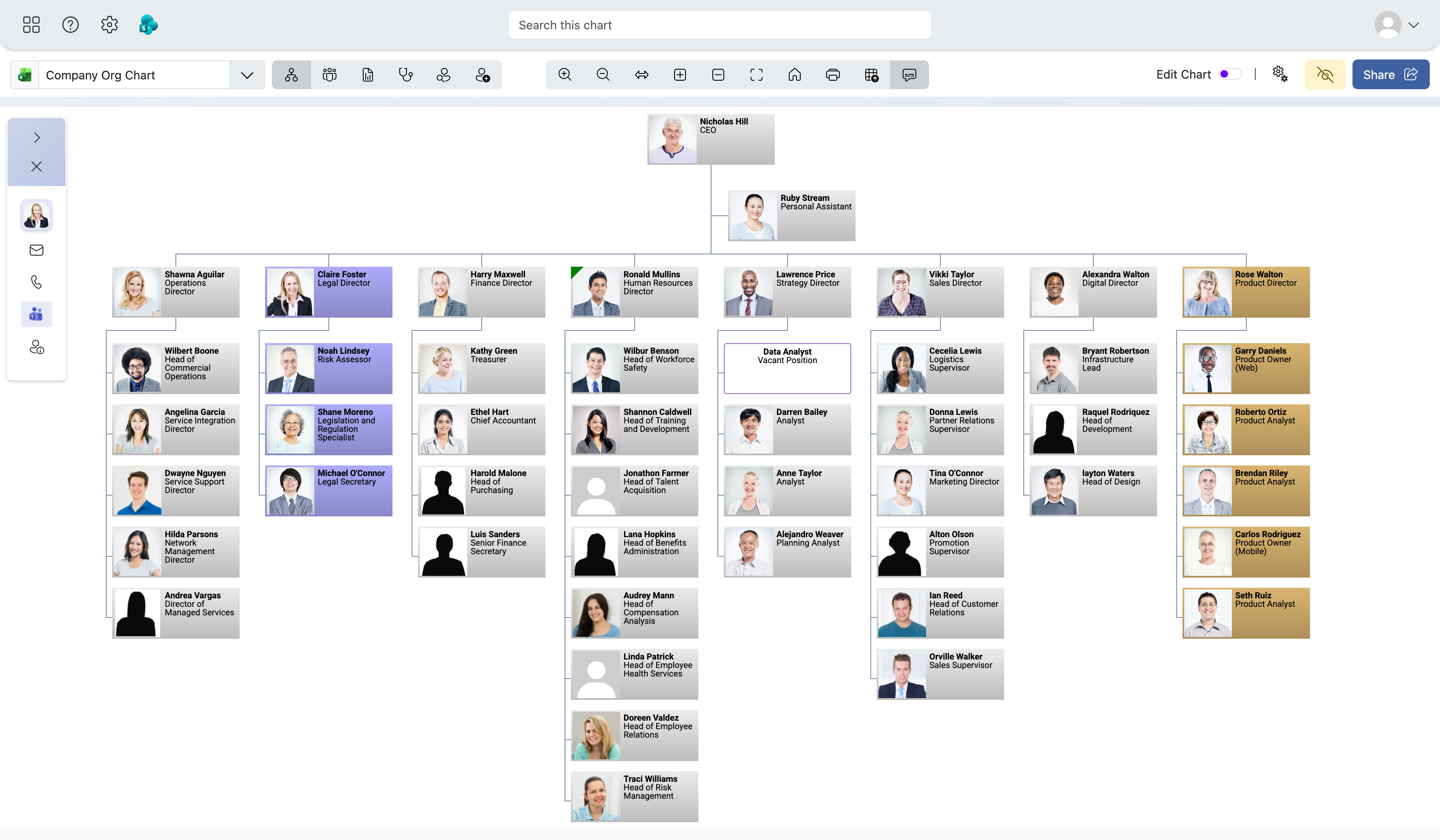
Designed for companies that want a searchable organization chart connected to real employee data and available in their existing M365 workflow.
Start your free 30-day trial
Explore every TeamOrgChart feature with no commitment and no credit card. Sign in with your Microsoft work or school account to get started.
 Sign in with Microsoft
-
Easy configuration and simple maintenance
Configure charts without coding. Non-IT administrators can create and maintain chart views using guided configuration options, reducing the need for manual diagram updates.
-
Built for Microsoft 365 organizations
Modern workplaces already maintain employee and profile information in systems such as Microsoft Entra ID, SharePoint, Excel and other business platforms. TeamOrgChart uses that data to build organization charts that can be viewed in Microsoft Teams, Outlook, SharePoint and the web.
This reduces duplicate administration and helps ensure the org chart reflects the structure your business already manages elsewhere.
-
Go beyond Microsoft's standard organization view
Microsoft 365 includes basic organization views based on manager relationships. These can be useful for checking the structure around one person, but many businesses need more control over how the wider organization is presented, filtered and shared.
TeamOrgChart supports company-wide charts, departmental charts, regional views, filtered charts, planning views and charts that include assistants, co-managers, coordinators, vacancies and temporary positions.
Depending on your requirements, you can create charts that represent the way your business needs to communicate its structure, rather than simply reproducing the standard directory hierarchy.
-
Keep charts accurate as your organization changes
Organizations are constantly changing. People join, move, leave, take temporary assignments and report into different teams. TeamOrgChart helps administrators avoid the repeated work of manually moving boxes and redrawing reporting lines.
The chart layout is generated automatically to make the most of available screen space. Learn how TeamOrgChart creates automatically maintained org charts whose hierarchy, layout and presentation follow the underlying data.
Employees can then search, navigate and explore the latest chart instead of hunting for the newest file version.
-
Configure a chart that reflects the way you work
TeamOrgChart includes configuration and design options that allow the chart to reflect the way your organization works.
You can configure employee card contents, colours, conditional formatting, chart starting points, displayed depth, exclusion rules, vacant positions, custom organizational data, printing and PDF export options.
This gives you control over both the information shown in the chart and the way different audiences experience it.
-
Intuitive search and navigation
Large organization charts are difficult to use as static diagrams. Attempting to fit an entire organization onto one page can make the chart difficult to read and navigate.
TeamOrgChart provides an interactive view of the hierarchy, allowing users to search for people, find managers, view direct and indirect reports, move through management levels, expand branches and focus on specific departments, regions or reporting lines.
This makes the organization chart useful as an everyday company resource, not just a document for onboarding, restructuring or management meetings.
-
Gain insight into your organizational structure
TeamOrgChart can help managers and administrators understand more than who reports to whom. With additional data, filters and chart views, it becomes easier to review team size, reporting depth, vacant roles and areas of the organization that may need attention.
These views can support workforce planning, restructuring conversations and better visibility across departments, locations and business units.
-
Build from Entra ID, Excel, SharePoint and other data sources
For many organizations, Microsoft Entra ID is the primary source of employee profile and reporting information. TeamOrgChart can use manager relationships and employee profile information stored in Entra ID to generate the organization chart automatically.
Your organization chart does not have to be based solely on Entra ID. TeamOrgChart can also work with employee information from Excel, CSV files, SharePoint, OneDrive, Active Directory, HR exports and other organizational datasets.
This allows TeamOrgChart to represent a more complete workforce, including employees or positions that may not exist in your Microsoft 365 directory.
-
Access charts from your existing Microsoft workflow
An organization chart is most useful when it is available through the applications your employees already use.
TeamOrgChart can be accessed in Microsoft Teams, Outlook, SharePoint and a web browser, helping employees search for colleagues, explore reporting relationships and navigate the organization without locating a separate diagram file.
-
Create as many charts as you need
Different teams often need different views of the same organization. A senior leader may need a company-wide view, while HR, IT, finance or local managers may need charts focused on specific departments, regions or planning scenarios.
TeamOrgChart allows you to create multiple charts from your employee data, so each audience can access the view that is most useful to them.
Who is TeamOrgChart for?
TeamOrgChart is designed for organizations that use Microsoft 365 and need an accurate, searchable organization chart across Microsoft Teams, Outlook, or SharePoint.
- Have outgrown manually maintained PowerPoint, Excel, or Visio charts
- Want employees to search and explore reporting relationships
- Need multiple views of the organization
- Need to represent vacant, temporary, or planned positions
- Want predictable organization-wide pricing
It is used by organizations of many sizes, from small, single-site businesses to large multinational companies with complex departmental, regional, and management structures.
Why TeamOrgChart?
An accurate organization chart can help employees and managers understand how the business is structured and how different people, teams and departments relate to one another.
TeamOrgChart may support:
- Employee onboarding and orientation
- Finding colleagues and understanding reporting relationships
- Communication and collaboration across departments
- Organizational restructuring and workforce planning
- Management and board reporting
- Maintaining visibility across locations, regions and time zones
Frequently asked questions
Discover what else TeamOrgChart can offer your organization.
TeamOrgChart combines data-driven chart creation, Microsoft integration, visual customization, planning support, search and export tools in one organization chart platform.